
The AI tools for real estate agents that earn their keep in 2026 each do one job well: a chatbot (ChatGPT, Claude or Gemini) for listing descriptions and emails, an AI photo editor and virtual stager, a photos-to-video tool, Canva for social graphics, a note-taker for calls, the AI inside your CRM, an AI CMA helper and a website chatbot. Most have a free tier. None of them replaces your review of every fact, photo and word before it reaches a client or the MLS.
VidListings makes a listing video tool, which is one of the 15 below. We've tried to keep this guide useful whether or not you use it.
You won't be early. In NAR's 2025 Technology Survey, ChatGPT was the most-used AI tool among respondents (58%), followed by Gemini (20%) and Copilot (15%). Almost half (46%) said they use AI-generated content such as listing descriptions, and 32% had not used AI in their business yet (NAR).
We sorted the tools by job. Prices are in US dollars from each tool's own pricing page as of October 2026. Where we couldn't verify a US price, we say so.
The best AI tools for real estate agents at a glance
| Job | Tool | Free tier | Starting price (Oct 2026) | Best for |
|---|---|---|---|---|
| Listing copy, emails | ChatGPT | Yes | Plus $20/mo | Most agents |
| Listing copy, emails | Claude | Yes | Pro $17/mo yearly, $20 monthly | Long documents, careful rewrites |
| Listing copy, emails | Gemini | Yes | Varies by country | Gmail and Google Docs users |
| Photo editing | Autoenhance.ai | Watermarked previews | $0.75 per image | Exposure, verticals, HDR |
| Virtual staging | Virtual Staging AI | No | $16/mo yearly, $25 monthly | Empty rooms |
| Listing video | VidListings | Early access | Not published | Photos to a vertical video |
| Talking-head video | Descript | Yes | $16/mo yearly, $24 monthly | Market updates with captions |
| Social graphics | Canva | Yes | Varies by country | Posts, flyers, carousels |
| Transcription | Otter.ai | Yes, 300 min/mo | $8.33/mo yearly, $16.99 monthly | Recording consultations |
| Meeting notes | Fathom | Yes | $16/mo yearly, $20 monthly | Video call summaries |
| CRM follow-up | Follow Up Boss | 14-day trial | $58/user/mo yearly, $69 monthly | Teams that live in the CRM |
| CRM follow-up | Lofty | No | Quote only | CRM with built-in AI agents |
| Lead follow-up | Ylopo | No | Quote only | Teams buying online leads |
| Market analysis | RPR AI CMA | Included with NAR membership | No extra cost | CMAs from your phone |
| Website chat | Tidio | Yes | $24.17/mo yearly, $29 monthly | After-hours questions |
Writing listing descriptions and emails: ChatGPT, Claude, Gemini
This is where AI for real estate agents usually saves the most time. Paste the facts, get a draft, edit it.
ChatGPT
Drafts listing descriptions, emails, captions and video scripts from the facts you give it. Free tier: yes. Paid: Plus is $20/month (OpenAI). Caution: on individual plans your chats can be used to train models unless you turn off "Improve the model for everyone" in Settings > Data controls (OpenAI).
Claude
Good at long inputs (an HOA packet, an inspection report) and at rewriting in your voice. Free tier: yes. Paid: Pro is $20/month, or $17/month billed yearly (Claude). Caution: on Free, Pro and Max, Anthropic trains on your chats only if that setting is on, and chats are then kept for five years (Anthropic). Check the setting.
Gemini
Google's chatbot. Paid Google AI plans add Gemini inside Gmail and Docs, handy if your business runs on Google (Google). Free tier: yes. Paid: prices vary by country, so check Google's plan page. Caution: like every chatbot, it can state wrong details about schools, taxes or HOA fees with total confidence.
ChatGPT for real estate agents: 3 prompts to copy
Each prompt works in ChatGPT, Claude or Gemini. Each one gives the model only your facts, tells it to flag gaps instead of guessing, and includes a fair housing instruction.
1. Listing description
Write an MLS listing description for my listing.
Use ONLY these facts. Do not add features, measurements, school names or distances.
- Area: [neighborhood, city]
- Price: [$]
- Beds / baths / sq ft / lot: [ ]
- Year built and updates: [ ]
- Top 5 features: [ ]
Give me 3 versions: (1) MLS public remarks under [X] characters,
(2) a 120-word website version, (3) a 2-sentence social caption.
Fair housing: describe the property, never the buyer. Do not mention or imply
race, color, religion, sex, disability, familial status or national origin.
Avoid phrases like "perfect for families" or "ideal for singles".
If a fact is missing, write [CHECK] instead of guessing. No exclamation marks.
2. Lead follow-up email
Write a follow-up email to a buyer lead who asked about [address].
Facts: [price, beds/baths, 2 standout features, link to listing].
Offer these showing times: [3 options].
Under 120 words, friendly and plain, end with one question.
Do not describe the neighborhood's residents, safety or schools.
Use no facts beyond the ones above. Mark anything uncertain [CHECK].
3. A week of listing content
Turn this listing into 5 social posts: just listed, feature spotlight,
open house reminder, price and details card, and a short story about the home.
Facts: [paste listing details]
For each: a hook under 10 words, a caption under 60 words,
and on-screen text under 8 words for a video.
Same rules: describe features, never the ideal buyer; no invented facts; mark gaps [CHECK].
Then read the draft against the MLS sheet line by line. The [CHECK] markers show you where to look first.
Listing photos: AI editing and virtual staging
Autoenhance.ai
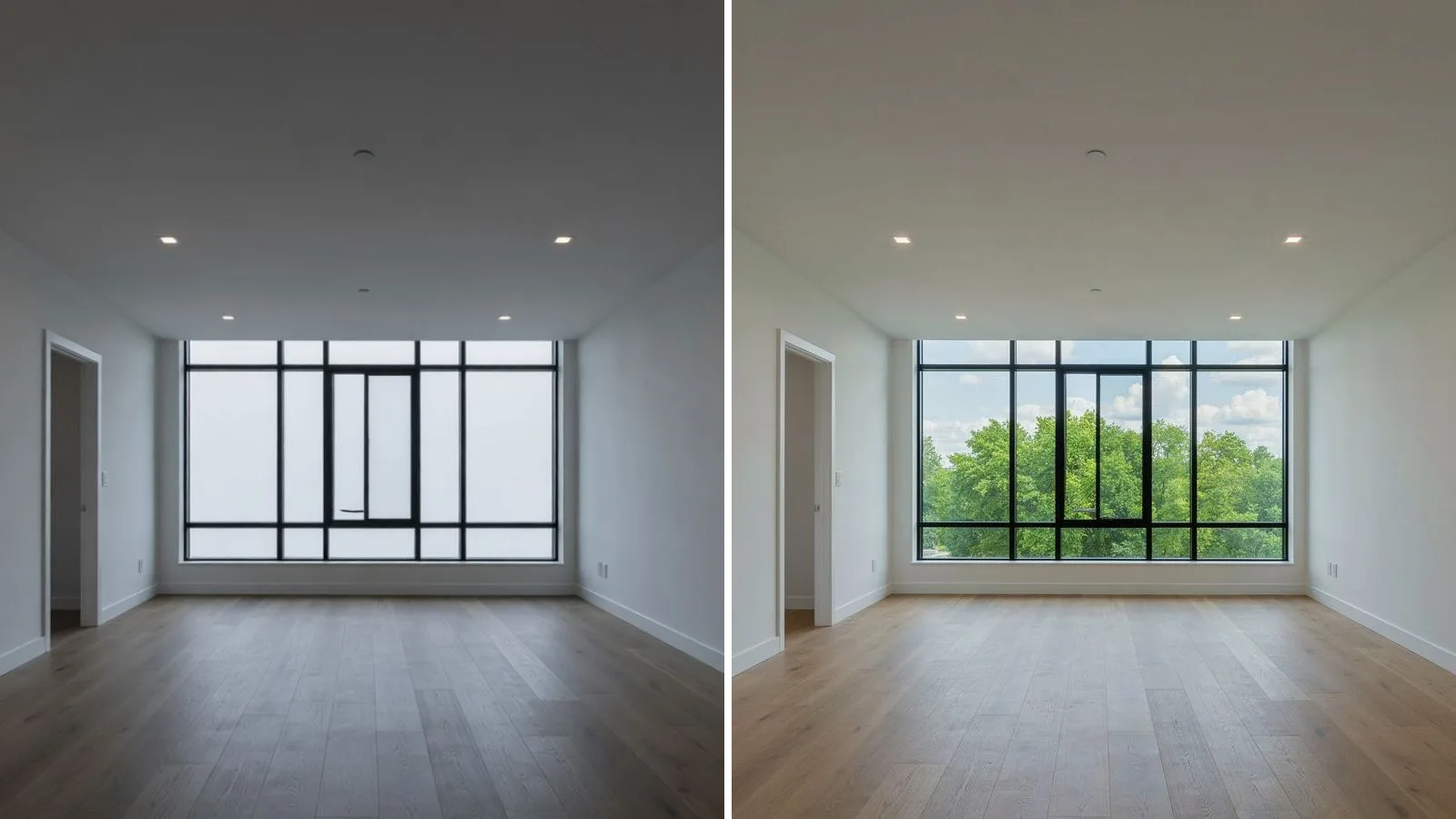
Fixes exposure, white balance and color, merges HDR brackets, straightens verticals and can replace skies or pull window views (Autoenhance.ai). Free tier: watermarked previews, no card needed. Paid: $0.75 per image pay-as-you-go, or monthly plans. Caution: sky replacement and window pulling change what buyers see. Depending on your state and MLS, that can require a disclosure.
Virtual Staging AI
Furnishes empty rooms in about 10 seconds, with furniture removal included. Free tier: no free plan (the page mentions a free image editing trial). Paid: from $16/month billed yearly, or $25 month-to-month, for 6 photos a month (Virtual Staging AI). Caution: label every staged photo and show the empty original. Our virtual staging guide covers disclosure rules, and free AI virtual staging covers what free tools actually give you.
Real estate content AI: listing videos, talking-head clips and graphics
VidListings
Paste a Zillow, Realtor.com or Redfin link (or upload 5 to 30 photos), pick and order the photos, and VidListings turns each into a roughly 3-second clip with an AI camera move. It adds music, a price and beds/baths card, your agent card and title cards like "Just Listed" or "Open House", then exports 9:16, 1:1 and 16:9. Free tier and price: in early access, pricing not published. Caution: it moves your real photos and doesn't invent rooms, so the video is only as good as the photos. It has no voiceover or captions. More in AI real estate video without fake rooms.
Descript
Edit video by editing the transcript, cut filler words, and add captions from the transcript (Descript). Good for market updates and agent intro videos. Free tier: yes. Paid: Hobbyist is $16/month billed yearly, $24 monthly, with watermark-free 1080p exports (Descript). Caution: it has AI voice cloning; never put words in a client's mouth.
Canva
Templates for just listed posts, flyers, carousels and stories, with AI design tools on a shared usage allowance. Free tier: yes. Paid: Pro adds premium content and more AI; prices vary by country (Canva). Caution: never use an AI-generated image to stand in for the listing itself. For ideas, see our 40 real estate social media post ideas.
Meeting notes, CRM and lead follow-up
Otter.ai
Records and transcribes calls and in-person meetings, then summarizes them. Free tier: yes, 300 transcription minutes a month. Paid: Pro is $8.33/month billed yearly, $16.99 monthly (Otter.ai). Caution: ask before you record. Consent rules vary by state.
Fathom
Joins your video calls and produces a transcript, summary and highlights. Free tier: yes, with unlimited recordings and instant AI summaries. Paid: Premium is $16/month billed yearly, $20 monthly, and adds AI action items (Fathom). Caution: tell clients a note-taker is on the call before it starts.
Follow Up Boss
A real estate CRM whose AI features include smart summaries, smart messages, suggested tasks and predictive lead prioritization. Free tier: no, 14-day trial. Paid: Grow is $58 per user/month billed yearly, $69 monthly (Follow Up Boss). Caution: some AI features use data from its calling feature, a paid add-on on Grow.
Lofty
A real estate CRM platform. Its pricing page lists AI lead scoring, AI task prioritization and custom AI agents on every plan, with Sales, Social and Homeowner agents as add-ons (Lofty). Free tier: no. Paid: quote only. Caution: get the add-ons priced before you sign.
Ylopo
Lead generation with AI follow-up: AI Text (since 2018) and AI Voice (launched August 2025), which calls leads, asks about timeline and budget, and transfers warm ones to you (Ylopo). Free tier: no. Paid: quote only, after a call. Caution: listen to sample conversations before an AI talks to your leads, and confirm how consent for automated calls and texts is collected.
Pair any of these with fast ads and fast follow-up: our real estate Facebook ads guide covers the ad side.
Market analysis and website chatbots
RPR AI CMA
Realtors Property Resource's AI CMA, in RPR Mobile since November 2025, scores comps from 0 to 100, compares them side by side and suggests pricing strategies; you can remove any comp (NAR). RPR also has an AI ScriptWriter that turns market data into posts and emails (NAR 2026 member guide). Free tier: included with NAR membership. Caution: public data misses condition, concessions and upgrades. The score is a starting point, not your price opinion.
Tidio
A website chat widget with Lyro, an AI agent that answers repeat questions and hands off to you. Free tier: yes, with 50 conversations a month and 50 one-time Lyro AI conversations. Paid: Starter is $24.17/month billed yearly, $29 monthly; more Lyro usage costs extra (Tidio). Caution: chatbot answers about a listing are your advertising. Limit it to facts you provide and route questions about schools, safety or "who lives there" to a person.
What are the risks of real estate AI tools?
Fair housing. The Fair Housing Act bans any ad that indicates a preference based on race, color, religion, sex, disability, familial status or national origin (42 U.S.C. § 3604(c)), and HUD's rule covers "words, phrases, photographs, illustrations" (24 CFR § 100.75). AI-written copy counts. HUD withdrew its 2024 guidance on algorithm-driven housing ads, effective September 17, 2025, but the notice says violations of the Act remain subject to enforcement and people can still sue (Federal Register).
Made-up facts. Chatbots invent plausible details: a "renovated" bath, a school district, a five-minute walk. The NAR Code of Ethics (Article 12) requires REALTORS® to "present a true picture" in their advertising (NAR). Use a facts block and [CHECK] markers.
Client data. Don't paste Social Security numbers, loan documents or offer terms into a consumer chatbot. Turn off training, or use a business plan: OpenAI says it doesn't train on ChatGPT Business or Enterprise data by default (OpenAI).
Altered photos. California's AB 723, signed October 10, 2025 and in effect since January 1, 2026, requires a disclosure on or next to any digitally altered listing image plus a link or QR code to the unaltered original. It covers adding, removing or changing things like furniture, flooring, paint, utility poles and views through windows, but not lighting, white balance, exposure or cropping (California Legislature). MLSs add their own rules: Stellar MLS allows virtual staging but bars removing utility lines, adding plantings, swapping permanent fixtures or changing paint colors (Stellar MLS). Check yours.
The short version
- Start with one chatbot and the AI already in your CRM. Use the three prompts above.
- Edit photos honestly: light and color are fine; anything added or removed gets a label.
- Turn listing photos into a vertical video, and record talking-head clips with captions.
- Record and summarize calls only with consent.
- Read every AI draft against the MLS data before it goes anywhere.
If listing videos are the gap in your marketing, VidListings turns your listing photos into one in a few minutes. It's free to start.